Introduction to Kyverno Reporting
Motivation
Policy Reporter makes the results of your Kyverno validation policies visible and observable. By default, Kyverno provides the option to create your validation policies in audit or enforce mode. While enforce will block applying a manifest that violate the given policy, audit will create a report that provides information about resources that pass or fail your policies. Note that for requests that are denied by admissions control because of policy violations in enforce mode, Kubernetes resources are not created, so no result is recorded for them. Enforce policies are still reported on in two other ways: resources that satisfy an enforce rule are admitted and recorded as pass, and policies with background: true are re-evaluated against resources that already exist in the cluster, which records fail entries for pre-existing violations. Because Policy Reports are Custom Resources you can access them with kubectl get/describe.
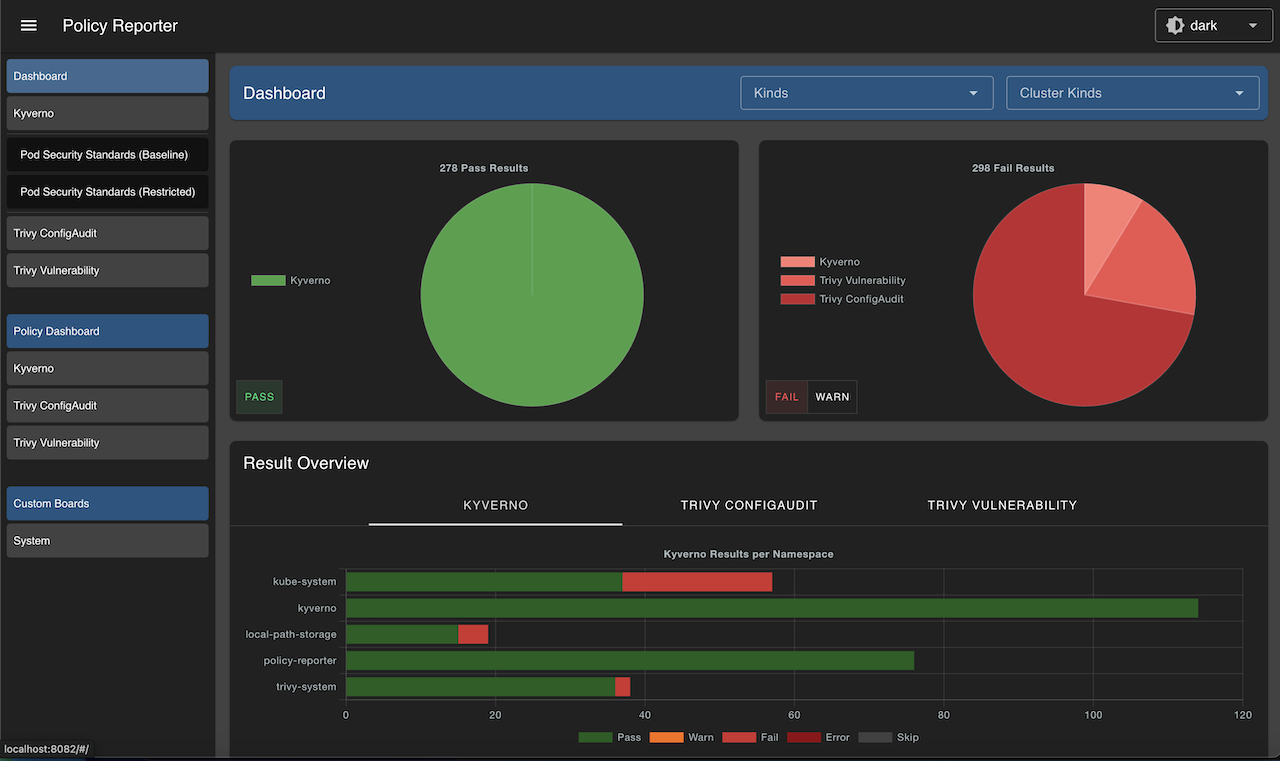
Policy Reporter provides also a standalone Dashboard to get a graphical overview of all results with filter and an optional Kyverno Plugin to get also information about your Kyverno policies.
Architecture

Policy Reporter
This is the core application and watches for PolicyReport and ClusterPolicyReport resources in the cluster. Policy Reporter uses internal listeners to react to incoming events and apply its logic to them.
-
MetricsListener (optional) creates metrics based on new, updated, and removed resources
-
StoreListener (optional) persists new resources and every change of an existing resource in an internal representation in the included SQLite database
-
ResultsListener checks each new and updated report for new results and publishes them to all registered PolicyResultListeners
-
SendResultListener is a PolicyResultListener and sends all new results to the configured targets
Policy Reporter Kyverno Plugin
This component watches for Kyverno (Cluster)Policy resources, like the Policy Reporter core application for (Cluster)PolicyReport resources. The collected data is transformed into a internal format and available over the embedded HTTP server as API endpoints.
This component is independent from the Policy Reporter core application and only consumed by the Policy Reporter UI.
Policy Reporter UI
This component is an optional, standalone UI for information provided by the Policy Reporter core application (and Policy Reporter Kyverno Plugin). This server also proxies all requests made by the UI to the Policy Reporter API.
Kyverno Plugin
The Kyverno integration is an optional plugin. If enabled, it provides additional views about Kyverno policies. This information is provided by the Policy Reporter Kyverno Plugin which will also be proxied.
Installation
If you have already installed Big Bang with Kyverno, Kyverno Policies, and Monitoring enabled, you can run the following to install Kyverno Reporter through Flux:
# Clone this repo
git clone https://repo1.dso.mil/big-bang/product/packages/kyverno-reporter.git
cd kyverno-reporter

# Create namespace
kubectl create namespace kyverno-reporter

# Clone the Iron Bank pull secret from Big Bang
kubectl get secret private-registry --namespace=kyverno -o yaml | sed 's/namespace: .*/namespace: kyverno-reporter/' | kubectl apply -f -

# Deploy Reporter
helm upgrade --install --namespace kyverno-reporter kyverno-reporter ./chart
Reporting
Kyverno policy reports are Kubernetes resources that provide information about policy results, including violations. Kyverno creates one report per resource matched by a policy rule.
Result entries are added to reports when a resource is admitted, and when a policy with background: true is evaluated against resources that already exist in the cluster. A resource that violates an enforce rule at admission is blocked, so no entry is created for it, but background scans still record violations by pre-existing resources regardless of whether the rule is audit or enforce. If the resource violates multiple rules, there will be multiple entries in the report for that resource. Likewise, if a resource is deleted, its report is removed along with it.
There are two types of reports that get created and updated by Kyverno: a ClusterPolicyReport (for cluster-scoped resources) and a PolicyReport (for Namespaced resources). The contents of these reports are determined by the violating resources and not where the rule is stored. For example, if a rule is written which validates Ingress resources, because Ingress is a Namespaced resource, any violations will show up in a PolicyReport co-located in the same Namespace as the offending resource itself, regardless if that rule was written in a Policy or a ClusterPolicy.
Note that PolicyReport and ClusterPolicyReport CRDs get installed with basic kyverno package, kyverno-reporter only uses the PolicyReport and Cluster to show them in the UI. The rest of this document describes how to trigger the reports and visualize them in the UI that is provided by kyverno-reporter.
Example: Trigger a Policy Report
Create a Kyverno Policy to check resource requests and limits
apiVersion: kyverno.io/v1
kind: ClusterPolicy
metadata:
  name: require-requests-limits
  annotations:
    policies.kyverno.io/title: Require Limits and Requests
    policies.kyverno.io/category: Best Practices
    policies.kyverno.io/severity: medium
    policies.kyverno.io/subject: Pod
spec:
  background: true
  rules:
  - name: validate-resources
    match:
      any:
      - resources:
          kinds:
          - Pod
    validate:
      failureAction: Audit
      message: "CPU and memory resource requests and limits are required."
      pattern:
        spec:
          containers:
          - resources:
              requests:
                memory: "?*"
                cpu: "?*"
              limits:
                memory: "?*"
The policy sets background: true, so Kyverno evaluates the resources already running in the cluster and populates the reports without any new workload. To trigger a result with a new Pod instead, note that in a Big Bang cluster the kyvernoPolicies package applies its own policies to anything you create: the Pod must use a tagged image from registry1.dso.mil or registry.dso.mil.
Get Policy Report
kubectl get polr -n alloy

NAME                                   KIND             NAME                                     PASS   FAIL   WARN   ERROR   SKIP   AGE
06b94b5d-485c-46f8-be3f-f1af647aacf3   Pod              alloy-alloy-operator-689999d796-kwhh8    29     2      0      0       1      88m
0726c429-f5c3-4d27-905c-cbfb36e0a88b   ReplicaSet       alloy-alloy-operator-689999d796          0      1      0      0       0      21s
09a72f5f-e4a4-4e72-a53e-4216b187c085   Lease            alloy-alloy-operator                     0      0      0      0       1      105m
0df91ce9-f2f3-4bca-a79b-3549465af2c6   ServiceAccount   alloy-alloy-operator                     1      0      0      0       0      88m
The KIND and NAME columns identify the resource each report describes; the report’s own name is the resource UID.
View Policy Report
kubectl get polr 0726c429-f5c3-4d27-905c-cbfb36e0a88b -n alloy -o=yaml

apiVersion: wgpolicyk8s.io/v1alpha2
kind: PolicyReport
metadata:
  labels:
    app.kubernetes.io/managed-by: kyverno
  name: 0726c429-f5c3-4d27-905c-cbfb36e0a88b
  namespace: alloy
  ownerReferences:
  - apiVersion: apps/v1
    kind: ReplicaSet
    name: alloy-alloy-operator-689999d796
    uid: 0726c429-f5c3-4d27-905c-cbfb36e0a88b
scope:
  apiVersion: apps/v1
  kind: ReplicaSet
  name: alloy-alloy-operator-689999d796
  namespace: alloy
  uid: 0726c429-f5c3-4d27-905c-cbfb36e0a88b
results:
- category: Best Practices
  message: 'validation error: CPU and memory resource requests and limits are required.
    rule autogen-validate-resources failed at path /spec/template/spec/containers/0/resources/limits/'
  policy: require-requests-limits
  properties:
    process: background scan
  result: fail
  rule: autogen-validate-resources
  scored: true
  severity: medium
  source: kyverno
  timestamp:
    nanos: 0
    seconds: 1785947855
summary:
  error: 0
  fail: 1
  pass: 0
  skip: 0
  warn: 0
Example: Trigger a Cluster Policy Report
A ClusterPolicyReport is the same concept as a PolicyReport only it contains resources which are cluster scoped rather than namespaced.
As an example, create the following sample ClusterPolicy containing a single rule which validates that all new Namespaces should contain the label called maintainer and have some value.
Create the Policy
apiVersion: kyverno.io/v1
kind: ClusterPolicy
metadata:
  name: require-ns-labels
spec:
  background: true
  rules:
  - name: check-for-labels-on-namespace
    match:
      any:
      - resources:
          kinds:
          - Namespace
    validate:
      failureAction: Audit
      message: "The label `maintainer` is required."
      pattern:
        metadata:
          labels:
            maintainer: "?*"
Get Cluster Policy Report
kubectl get cpolr

NAME                                   KIND        NAME          PASS   FAIL   WARN   ERROR   SKIP   AGE
9b9bf80f-14e7-419a-8e80-89291766b90b   Namespace   alloy         1      1      0      0       0      88m
2ca5b814-2b0f-4df7-bff7-9f4b0fb3e59f   Namespace   bbctl         1      1      0      0       0      88m
f89d970c-ecf6-4ee0-8c1b-2f0adae00cc3   Namespace   bigbang       0      1      0      0       0      88m
176cb69c-dbad-43ef-9d06-9514b6db2804   Namespace   default       0      1      0      0       0      88m
b4a70b06-7c30-4209-9c8b-4efc62009d2d   Namespace   flux-system   0      1      0      0       0      88m
Each Namespace gets its own report, so the listing also includes reports for every other cluster-scoped resource in the cluster.
Policy Reporter UI
Access Policy Reporter at http://localhost:8080 via port forwarding:
kubectl -n kyverno-reporter port-forward service/policy-reporter-ui 8080:8080